Microsoft Project Training Courses
Instructor-led Microsoft Project training for UK teams, on-site or live online.


Two one-day courses on the Microsoft Project desktop app: Introduction builds a plan from a blank project, Advanced takes a working schedule through baselines, critical path and custom reports. £315 per person on public dates, or your whole team on-site.


Which Microsoft Project course does your team need?
Which Microsoft Project course does your team need?
Two instructor-led courses, one day each, both taught on the Microsoft Project desktop application. Public dates run as a pair, Introduction one day and Advanced the next, so a team can book either or both. Every course also runs on-site at your offices with the exercises adjusted to your own projects.
Project Introduction
For new or occasional project managers, team leaders planning small projects, and PMO support staff who have inherited a plan. No previous Project experience needed. They leave able to start a project from blank, set working-time calendars, add tasks with durations, dependencies, summary tasks and milestones, assign and level resources, track progress against the plan, and print, share and export it for stakeholders. 1 day. £315 per person ex VAT on public dates.
Project Advanced
For experienced users running complex schedules: project managers, PMO analysts and schedulers who already build plans in Project and need them to hold up under change. They leave able to baseline a project and read earned value, manage the critical path with lag and lead, link projects and work with custom fields, build custom views and format the Timeline, and produce custom and visual reports for stakeholders. 1 day. £315 per person ex VAT on public dates.
Not sure which day? If anyone on the team has never set a predecessor or a milestone, start with Introduction; the two days are scheduled back to back for exactly that reason. Our walkthrough on building a first project plan in Microsoft Project shows the level Introduction starts from. Or call us and we will tell you straight.
Our Courses
Our Courses
Browse our professional training courses and find the right fit for your team

Next Running
30th NovemberProject Introduction
Get to grips with Microsoft Project in this practical one-day course. Designed for beginners, it takes you through the basics of starting projects, organising tasks and allocating resources to help you manage simple projects more efficiently in your organisation.
Virtual / On-Site1 Day£315 per person, ex VAT
4.8/5from 21 delegate ratingsRated 4.8 out of 5 from 21 delegate ratings.Next Running
15th JanuaryProject Advanced
Advance your skills with our 1-day Microsoft Project Advanced course—ideal for experienced users who want to manage complex tasks, create tailored reports, and improve planning efficiency. This course is delivered for the desktop version, giving you practical ways to streamline project delivery in your organisation.
Virtual / On-Site1 Day£315 per person, ex VAT
4.6/5from 6 delegate ratingsRated 4.6 out of 5 from 6 delegate ratings.
What a day of Microsoft Project training with us actually covers
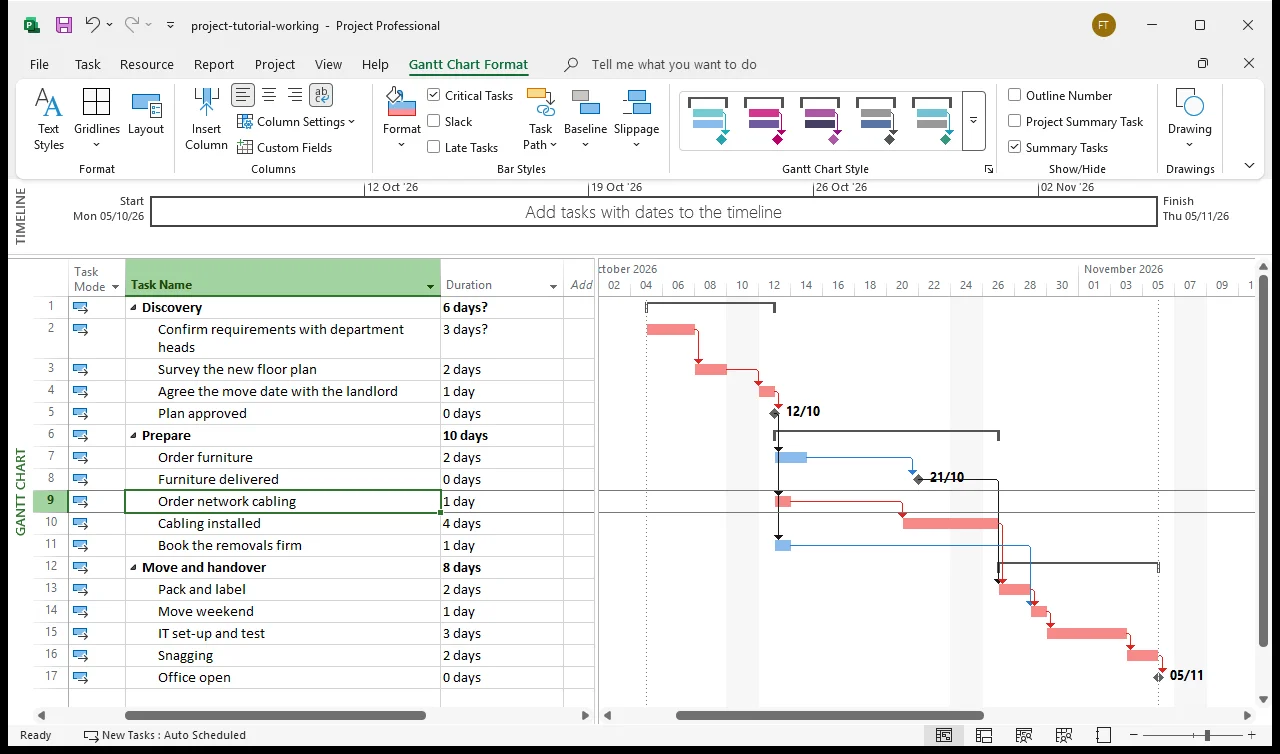
Every exercise is built on the desktop application, starting from a blank project rather than a template. On Introduction the group builds a real plan end to end: working-time calendars, tasks and durations, finish-to-start dependencies, summary tasks and milestones, then assigns resources, levels the overallocations and tracks progress against the plan. On Advanced the same kind of plan is baselined, its critical path is tightened with lag and lead, custom fields and views are added, and the day finishes with custom reports and an exported Timeline a sponsor would read.
Public dates are capped at six delegates, so everyone drives the software for the whole day and the trainer has time for the plan you brought with you. On-site groups work on their own project data where that is practical.
Teams we have trained on Project recently include University Hospitals Dorset NHS Foundation Trust, the National Institute for Health and Care Excellence, Natural England, Tods Defence, Fortive and Niras Group. One UK environmental services group has booked Project Introduction and Project Advanced seats alongside Excel and SQL with us across seven consecutive years; the seven-year case study describes how a rolling programme like that works.
We teach the desktop version of Microsoft Project, which is what Project Standard, Project Professional and Project Plan 3 and 5 all install. Planner and Project for the web are different products with a different feature set; if your team has moved to those, tell us before you book and we will say honestly whether a course is the right fit.

Why UK teams choose Future Savvy for Microsoft Project training
Named teams, repeat bookings. NHS trusts, NICE, Natural England and defence and engineering firms have put delegates through Project Introduction and Advanced with us, and a UK environmental services group has come back for seven consecutive years: read the case study.
Trainers who schedule projects for a living. Every course is instructor-led and hands-on, built on a realistic plan rather than slides, and the trainer will take the plan your team is struggling with and work through it in the room.
Small groups by design. Public dates are capped at six so nobody waits for a turn at the software. On-site there is no fixed limit; we recommend eight or fewer.
Support that continues after the day. Unlimited post-course email support, and a 100% money-back guarantee on every Microsoft Project course.
Microsoft Project training: frequently asked questions
Book Project Introduction if you are new to the software or have only ever edited someone else's plan: it starts from a blank project and covers calendars, tasks, dependencies, milestones, resources and tracking. Book Project Advanced if you already build plans in Project and need baselines, earned value, critical path control, custom fields and views, and custom reports. Public dates run the two on consecutive days, so a mixed team can send people to one or both.
No. Introduction assumes you have never opened the application. Basic Windows and Office familiarity is enough. Advanced assumes you already manage projects in Project and are comfortable with the fundamentals the Introduction day covers.
The desktop application, which is what Project Standard, Project Professional and the Project Plan 3 and Plan 5 subscriptions install. We do not currently run courses on Planner or Project for the web, which are separate products with a smaller scheduling feature set. If your team has moved to those, tell us when you enquire and we will say honestly whether a course is the right fit.
Each course is one day. Public dates are £315 per person excluding VAT, with live dates and prices shown on the course cards above; the price on the card is the price you pay. For a team on-site we quote on headcount, location and any tailoring, so ask for a group quote.
Both. Public dates run live online with a trainer, with everyone working in their own copy of Project and sharing screens when they get stuck. On-site training runs at your offices anywhere in the UK and can be tailored to your own project plans.
Public dates are capped at six delegates. On-site there is no fixed limit; we recommend eight or fewer so everyone gets trainer time, and larger groups can be split across days.
Start a project from blank, set working-time calendars, enter tasks with durations and link them with dependencies, add summary tasks and milestones, assign and level resources, record progress against the plan, and print, share and export views a sponsor can read. The Advanced day adds baselines and earned value, critical path management with lag and lead, custom fields, views and reports.
The scheduling engine has rules that are not obvious, which is why self-taught users get plans that move dates on their own. Once dependencies, constraints and resource levelling are explained in the right order, which is what a structured day does, most people are building usable plans by the afternoon. Our free walkthrough on building a first project plan shows the kind of ground Introduction covers.
Unlimited post-course email support from the trainer, and a 100% money-back guarantee on every Microsoft Project course.
Straight answers to the questions we hear most from teams choosing a Microsoft Project course.

Need to Talk To Us?
Need to discuss private or corporate Microsoft Project training?
All Future SavvyOur 1-day courses follow a curriculum designed to help you get the best out of Microsoft Project, but we can offer tailored training courses focused on the topics you need to cover based on your business needs and objectives. Enjoy private group training or one-on-one Microsoft Project courses at your own offices, anywhere in the UK, or online!
Contact us today and let us help you find a Microsoft Project course that unlocks your project management potential.