- TIPS & TRICKS/
- AI Invoice Processing: The End of Manual Entry/
- TIPS & TRICKS/
- AI Invoice Processing: The End of Manual Entry/
AI Invoice Processing: The End of Manual Entry
Why invoices still hurt
For many Accounts Payable (AP) teams, “processing invoices” still means email attachments, scanned PDFs, and hours of typing figures into an ERP or accounting system. Every step is a chance for mistakes: a wrong decimal, a missed due date, a duplicated payment. Cycle times stretch out, suppliers chase for updates, and finance leaders lack a clear, real‑time view of cash going out the door.
AI‑driven invoice processing is changing that picture. Modern tools can now read the vast majority of invoices automatically, pull out the key details, check them against purchase orders, and route them to the right approver without anyone re‑keying data. Instead of firefighting errors, AP teams can focus on exceptions, cash‑flow decisions, and supplier relationships.
This article explains, in straightforward language, how these systems work in practice and what they mean for you. You will see how AI can:
- Cut manual keying and errors
- Speed up approvals and payments
- Give finance leaders clearer, earlier cash‑flow insight
You will also get a simple roadmap for choosing, rolling out, and measuring AI invoice processing so you can prove its value quickly.
The end of typing from paper
Today, most AP processes still look like a patchwork:
- Invoices arrive by email, post, or supplier portals.
- Someone prints or downloads them, checks details on screen, and types them into the finance system.
- Approvals are chased by email, spreadsheet, or hallway conversations.
This manual handling is slow and brittle. It does not scale as volumes grow, and it makes it hard to see where an invoice is in the process or why a payment is late. Industry analysis suggests these analogue workflows can create 30–90 day cycles and significantly higher processing costs compared with digital alternatives, even in large, sophisticated finance functions.
AI invoice processing replaces all that typing with automated reading and routing. Using a mix of document scanning and pattern recognition, these tools can:
- Capture invoice data directly from PDFs, images, and scans without fixed templates
- Recognise suppliers, amounts, tax, and line items across different layouts
- Match invoices to purchase orders and route them to the right approver based on rules such as department, spend limit, or due date
As Forbes has noted in the wider context of intelligent document processing, the goal is “low‑touch or no‑touch” handling of routine documents, with AI converting unstructured content into structured data that finance systems can trust. In live deployments, vendors such as Stampli report AI reaching the same conclusion as human operators on invoice–PO matches in the vast majority of cases, with customers seeing days of manual checking reduced to minutes.
The result is fewer touchpoints, shorter cycle times, and much less rework. AP teams still stay in control-reviewing exceptions and high‑risk items-but the routine, repetitive work is handled by software rather than by hand. As one AP leader put it in a recent case study, “let the AI do the basic tasks, so the team can utilise their human ingenuity.”
Who this guide is for?
This guide is written for people who feel the pain of invoices every day but do not want a dense technical manual:
- AP managers under pressure to do more with the same headcount
- Finance leaders who need better control, visibility, and auditability
- Small business owners and controllers who juggle invoices alongside everything else
You do not need to understand how optical character recognition or machine‑learning models work under the bonnet. The focus here is on what matters in practice:
- What these tools actually do for your process
- How to fit them around the systems you already use
- How to bring your team with you so the change sticks
If you can map a current workflow and read a dashboard, you have all the technical background you need for what follows.
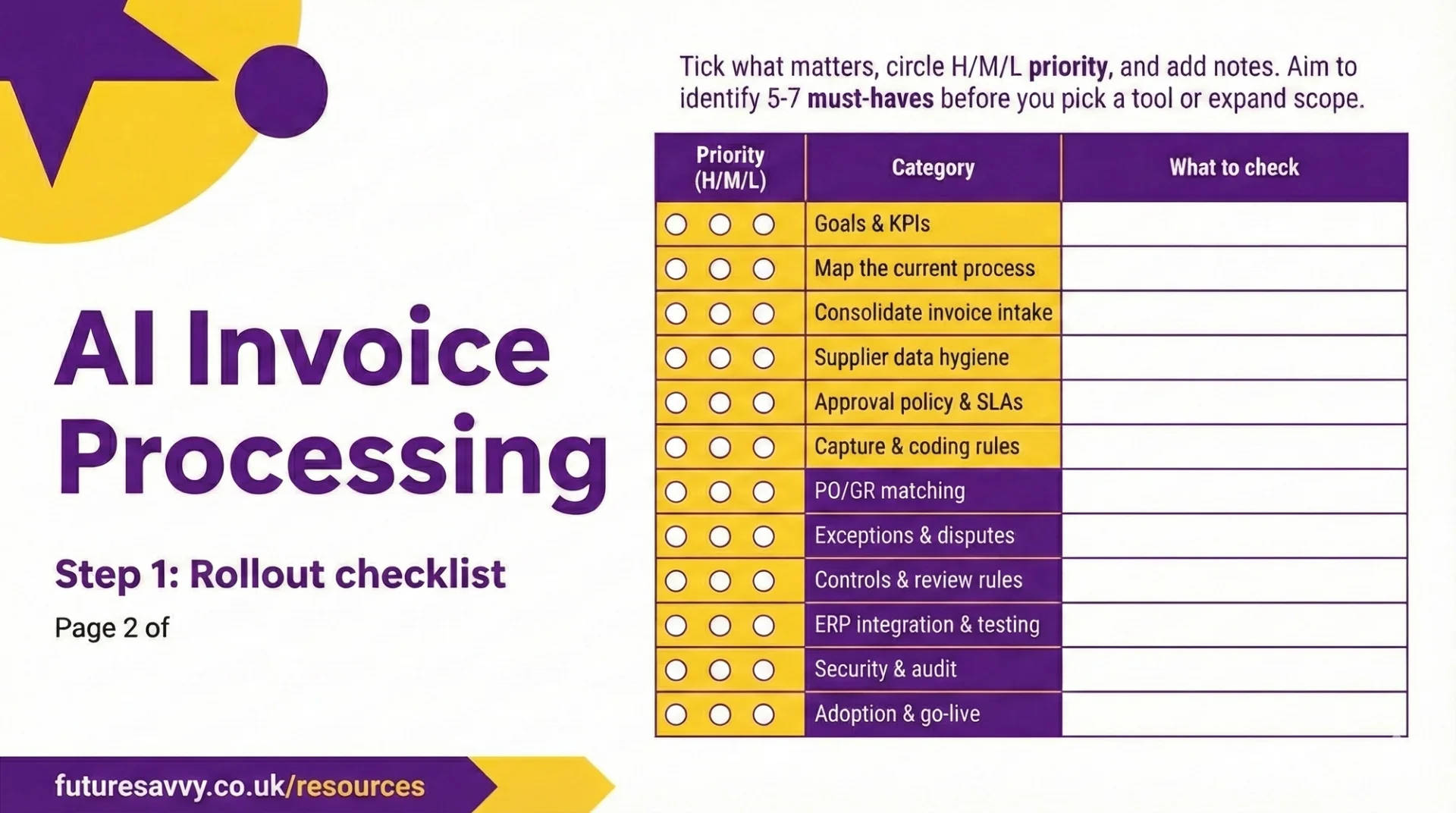
Download our AI Invoices Processing Rollout Checklist
Download nowWhat you’ll take away
By the end of this article, you will have a clear, practical picture of AI invoice processing and how to use it to retire manual entry.
You will understand:
What AI invoice processing does
How it captures data from invoices, routes them for approval, matches them to purchase orders, flags duplicates and anomalies, and posts clean entries into your ERP or accounting system. In practice, this is the same class of AI‑enabled automation that analysts expect to handle a growing share of business‑to‑business invoices worldwide with little or no manual intervention.
The key features to look for
Template‑free data capture, intelligent approval workflows, PO and line‑level matching, fraud and duplicate detection, smooth ERP integration, and dashboards that show cycle times, touchless rates, and discounts captured. Leading AP automation benchmarks show that organisations combining these capabilities can achieve materially lower cost per invoice and markedly faster cycle times than peers still relying on manual entry.
Asimple implementation and change‑management roadmap
How to map your current process, choose a pilot area, keep humans in control of approvals, set governance and ownership, run a short pilot, and iterate before scaling. This reflects common patterns from successful AI roll‑outs in finance: start with high‑volume, rules‑driven steps, then expand once data quality, controls, and user confidence are in place.
The core KPIs to prove ROI
Which metrics to track-such as receipt‑to‑approval time, percentage of invoices processed without manual touches, first‑pass yield, cost per invoice, and on‑time payments - so you can show clear gains within the first quarter and secure ongoing support. Real‑world programmes that track these measures routinely report double‑digit percentage reductions in processing times and error rates, alongside better cash‑flow visibility.
From Manual Chaos to AI‑Ready AP
Manual invoice processing is rarely the tidy flow shown in process diagrams. In reality it means inboxes full of PDFs, paper piled on desks, and the same data typed into multiple systems. An invoice arrives, someone prints or opens it, re‑keys supplier details, dates, amounts and VAT into the finance system, then emails or messages managers for approval. When something is mistyped, it bounces back for correction. Month‑end brings another flurry of chasing, checking and rework.
Over time this creates serious friction:
- Long cycle times from receipt to approval and payment.
- Regular typos, miscoding and duplicate entry.
- Patchy visibility of what is outstanding, paid, or disputed.
- A process that only “scales” by hiring more people.
Industry research on accounts payable automatio shows that many organisations still rely on these analogue steps, with cycle times stretching to 30–90 days and error rates that rise sharply with volume. As Finextra notes, manual reconciliation and keying create “scalability traps” for finance teams and hide the true cost of slow, error‑prone processing in weakened cash‑flow visibility and higher compliance risk.
For many AP teams, simply keeping up with volume leaves little time for cash‑flow planning, supplier conversations or analysis. The work is repetitive, but the stakes are high if something slips.
AI‑driven invoice processing changes this dynamic. Instead of building rigid templates, modern tools can read almost any invoice layout - paper scans, PDFs or images. They automatically pull out the key fields (supplier, dates, amounts, VAT, PO numbers) and post them straight into your ERP or AP system.
In practi,ce this combination of OCR, machine learning and workflow can cut processing costs by up to 80% and shorten cycle times by more than 70%, according to multiple digital payables studies and real‑world deployments such as AI‑powered invoice automation case studies. Built‑in rules and AI‑based workflows route each invoice to the right approver, prioritising by value, due date or risk, and flagging anomalies or possible duplicates before they cause problems.
What has shifted is that these capabilities are no longer reserved for big enterprises. Cloud‑based tools have become affordable for smaller organisations, and remote or hybrid working has made digital, touchless processing a necessity rather than a “nice to have”.
Analysts at Forbes describe intelligent document processing as a “force multiplier” for finance teams, turning unstructured invoice data into straight‑through processing without upending existing systems. Faster, more accurate AP improves cash‑flow visibility and strengthens supplier relationships, while positioning AI as an assistant that removes manual drudge work and frees finance professionals to focus on judgement, negotiation and insight.
What AI Invoice Processing Actually Does Day‑to‑Da
AI invoice processing changes daily work for Accounts Payable from “typing and chasing” to “checking and deciding”. Instead of keying data, hunting for POs, and emailing approvers, the system does the heavy lifting and the team handles the exceptions.
Template‑free data capture: no more manual keying
In practical terms, invoices simply arrive and appear in your AP system, already read and interpreted. The software pulls them in from shared email inboxes, scanners, or supplier portals, then uses AI to understand the layout without needing a bespoke template for each supplier. This “intelligent document processing” approach reflects what analysts describe as a shift to template‑less invoice capture across formats such as PDFs and scans, rather than traditional OCR plus manual checking.
It can reliably capture, in seconds:
- Supplier name and address, invoice number and dates
- Line items, quantities, unit prices and VAT
- PO numbers, bank details and payment terms
Vendors in this space report extraction accuracy at or near human levels for well‑configured environments, with AI models improving as they see more invoice layouts and corrections over time. Instead of an AP clerk typing 200 invoices a week, they spend their time reviewing what the AI has captured on screen, correcting the odd field, and approving the batch. The work shifts from repetitive data entry to light‑touch quality control, which cuts errors and makes month‑end far less frantic.
Smart matching and approval routing
Once the data is captured, the system automatically checks it against what you already know. It matches invoices to purchase orders and goods receipts, even when the wording or layout is slightly different, and flags any mismatches in quantity, price or missing receipts for a person to decide. Modern AI‑based PO matching engines have shown they can reach human‑level conclusions on complex line‑item comparisons in the vast majority of cases, even where legacy “proximity” matching tools struggled.
At the same time, AI‑driven workflows route each invoice to the right approver based on rules such as amount, department, supplier or cost centre. High‑value or urgent invoices are pushed to the front of the queue, with automatic reminders to keep things moving. As one AP technology leader puts it, “AI now does the legwork of reading, matching and routing invoices, so finance teams can focus on the decisions that actually need judgement.”
The impact is immediate: fewer “Have you seen this invoice?” emails, much clearer ownership of each step, and more invoices flowing through without anyone needing to prod the process along. Industry studies on digital payables consistently link this type of workflow automation to significantly shorter cycle times and lower cost per invoice.
Intelligent checks, fraud flags and duplicate detection
As invoices move through, the system runs continuous checks in the background. It spots duplicate invoice numbers or near‑identical documents before they are paid, and highlights unusual changes in bank details, unexpected amounts or activity from unapproved suppliers. AI‑driven anomaly detection is increasingly used to pick up issues that simple rules might miss, such as subtle pattern changes in invoice values or supplier behaviour over time.
This does not replace finance controls, but it does act as an always‑on safety net. The result is lower risk of overpayments, better fraud prevention and cleaner audit trails, with far less time spent unpicking problems after the fact. Finance commentators note that these “hidden” savings -fewer errors, less remediation work, stronger compliance – often rival the headline labour savings from automation.
Integration and visibility across your finance stack
Finally, approved invoice data flows straight into your accounting or ERP system -whether that is Sage, Xero, NetSuite, SAP or another platform - so there is no re‑keying between tools. Coding decisions (such as cost centres or projects) are carried across consistently. Many AI invoice tools now position themselves as orchestration layers that sit on top of existing ERPs, rather than replacements, which makes integration and adoption far less disruptive.
AP and finance leaders gain live dashboards showing:
- Invoices by status, due date and blocker
- Where bottlenecks sit, by department or approver
This joined‑up view gives much tighter control over cash outflows, clearer forecasting of upcoming payments, and the confidence to scale invoice volumes without adding the same level of headcount. External analyses of AP automation programmes regularly highlight this real‑time visibility – rather than just speed alone – as the factor that turns AI invoice processing from a back‑office efficiency project into a lever for better cash‑flow management and decision‑making.
Building the Business Case: Benefits and KPIs That Prove ROI
AI invoice processing earns its keep by doing the dull work at scale: reading invoices, checking them, and pushing them through approvals with minimal human touch. To win support, you need to translate this into clear benefits and numbers.
Core benefits in plain language
Efficiency and cost
AI captures and matches invoice data automatically, so your team spends far less time keying fields, chasing approvers, and fixing errors. Because the system can handle higher volumes without extra headcount, your cost per invoice falls as you grow. Independent benchmarks on accounts payable automation show processing cost reductions of up to 80% when invoice workflows are digitised and automated at scale, which is the order of magnitude you are aiming to emulate with AI‑driven tools.
Accuracy and quality
Machines are consistent. Once trained, AI tools reliably pull supplier details, amounts, VAT, and PO numbers from different formats. This means fewer typos, miscoded invoices, and reclassifications later on, and cleaner data feeding your ledgers and reports. In practice, mature AI‑based PO and invoice‑matching engines now mirror human decisions on line‑level matching in around 97% of cases in controlled tests, with some deployments reporting near‑perfect match rates after sufficient training data.
Speed and cash‑flow impact
Automated routing and prioritisation cut approval cycles from weeks to days or even hours. Faster approvals improve:
- On‑time and early payments
- Ability to capture early‑payment discounts
- Avoidance of late‑payment fees and strained cash‑flow
Vendors that have implemented AI‑powered invoice automation commonly report cycle‑time reductions in the 60–70% range, turning what used to be month‑long processes into far more responsive payables flows. As one AP leader put it, “the difference is going from firefighting late payments to actively managing cash.”
Risk and compliance
Every action in an AI workflow is logged: who approved, when, and against which policy. This creates a robust audit trail, helps enforce approval limits, and reduces the risk of duplicate payments or unauthorised supplier changes. AI‑driven anomaly detection can also flag suspicious invoices or unusual payment patterns before money leaves the organisation, strengthening fraud controls and compliance monitoring.
Team experience
AI does not replace AP teams; it removes the drudgery. Staff can focus on:
- Handling exceptions rather than every invoice
- Analysing spend and supplier trends
- Providing better support to vendors and internal stakeholders
This rebalancing of work is why many finance leaders describe AI as a “force multiplier” for existing teams rather than a headcount reduction exercise.
The KPI starter set: what to measure
Start by capturing a baseline of your current process before you switch anything on. Then track a focused set of KPIs to prove progress:
These metrics give you an objective before/after view within the first quarter of deployment and align closely with how leading organisations track value from AI‑enabled document processing in finance operations.
Telling the ROI story to stakeholders
For senior stakeholders, present a simple, visual narrative:
- Show before/after charts for cycle time, touchless rate, and cost per invoice over the first 3–6 months.
- Highlight specific outcomes: “We now process X more invoices per month with the same team” or “We increased early‑payment discounts captured by £Y.”
Then link the gains to wider goals:
- CFO: better cash‑flow visibility and more predictable working capital.
- Procurement: stronger supplier relationships through faster, more reliable payments.
- Risk and compliance: cleaner audit trails, fewer exceptions, and clearer control over approvals.
When the numbers and stories line up, the case for AI invoice processing becomes difficult to ignore and can be positioned alongside broader automation and AI initiatives already being pursued across the business.
How to Implement AI Invoice Processing Without the Headaches
AI invoice processing pays off fastest when you implement it methodically, not by “switching it on” overnight. Think of it as tidying your current process, then layering in automation where it will have the biggest impact. Independent research backs this up: organisations that streamline AP before automating are the ones that typically see the 70%+ cycle‑time reductions and large cost savings reported in accounts payable automation benchmarks.
Start by mapping your current process
Begin with what really happens today, not what the policy says should happen. Take a few recent invoices and trace them from arrival to payment:
- How they arrive: email inboxes, supplier portals, shared drives, post.
- Who handles them: AP, budget holders, finance managers, approvers.
- What they do: keying data, checking POs, chasing approvals, resolving queries.
- Where work gets stuck: unclear approvals, incomplete data, duplicate invoices.
Analysts looking at AI‑enabled AP consistently stress this “map reality first” step, because automating a broken flow just bakes in delays and errors at scale. As one AP specialist put it, “AI is a force multiplier – if the underlying process is poor, you simply multiply the chaos.”
Do a quick clean‑up before involving any AI. Otherwise you will simply automate waste:
- Remove approval steps that never add value.
- Standardise supplier records and account‑coding rules.
- Agree where invoices should land (one inbox or portal) to avoid hunting around.
These simple fixes alone can shorten cycle times and make it much easier for an AI tool to work accurately. Case studies of AI invoice rollouts that achieved 60%+ processing acceleration all started with this kind of basic hygiene and channel consolidation rather than jumping straight into model tuning.
Choose the right AI invoice processing tool
Ignore the jargon and judge tools on how well they fit your day‑to‑day work:
- Can it read your common invoice layouts without templates and pull out the right fields?
- Does it plug cleanly into your existing ERP or accounting system?
- Can you configure approval flows, limits and roles without a developer?
- Are there clear audit trails, permissions and security controls?
Industry guidance on intelligent document processing warns that “AI‑washing” is rife, so look for genuine capabilities such as machine learning, NLP and template‑free extraction rather than basic OCR wrapped in marketing. Providers that combine these techniques typically report very high data‑capture accuracy and strong straight‑through processing rates in production, in line with the 80%+ cost reductions seen in digital AP platforms.
Push vendors on specifics, not promises:
- How do they measure accuracy, and how quickly does it improve with your data?
- What happens when the AI is unsure — who reviews, and how is this flagged?
- How long does a typical implementation take, and what support is included?
External benchmarks can help frame these conversations. Some AI invoice tools now demonstrate 35x productivity gains in controlled environments, while others publish results such as 97–100% PO‑matching accuracy in real‑world AP teams, showing what is realistically achievable when data and workflows are well set up. A good tool should reduce manual effort, not force a complete rebuild of your finance stack.
Pilot, then scale in sensible phases
Resist the urge to automate everything at once. Run a focused pilot to prove value and de‑risk rollout.
Pick a narrow, high‑volume scope, for example:
- One business unit or country.
- A small group of suppliers or PO‑backed invoices under a certain value.
Run the pilot for 8–12 weeks with clear targets, such as:
- Faster invoice‑to‑approval times.
- Higher “touchless” processing rates and fewer data errors.
This mirrors the phased approach recommended in many AI invoicing playbooks and by AP practitioners who have moved from manual to intelligent workflows: start with low‑risk, rules‑based invoices and expand as the model learns. Reports on AI in invoice processing consistently show that teams who pilot in this way see steady improvements in extraction accuracy and exception rates month by month, rather than a single big‑bang change.
Hold weekly reviews with AP and your vendor to refine rules, feed back corrections, and adjust workflows. Once results are stable, extend the system:
- Add more suppliers and entities.
- Introduce more complex invoice types or higher‑value thresholds.
This phased approach builds confidence and lets you fix issues before they affect the whole organisation. It also gives you a clean before‑and‑after data set on cycle time, cost per invoice and exception rates — the core KPIs used in most AI invoicing case studies to evidence ROI.
Change‑management: bringing AP and approvers with you
The technology will fail if people do not trust or use it. Treat change‑management as part of the project, not an afterthought. Financial automation research repeatedly highlights resistance to changing “what has always worked” as one of the biggest blockers to successful AI adoption in AP.
Communicate clearly:
- Emphasise that AI is removing keystrokes and chasing, not eliminating jobs.
- Explain how invoices will be captured, routed, matched to POs, and flagged as exceptions.
Keep training short and practical:
- Brief sessions for AP on correcting AI errors and managing exceptions.
- Simple guides for approvers showing how to review, comment and approve in the new flow.
Put governance and ownership in place from day one:
- Name process owners for AP, approvals and exception handling.
- Define how issues are escalated and who can change rules or workflows.
- Agree when humans must review invoices — for example:
- Above certain values.
- From new or high‑risk suppliers.
- When the system flags potential duplicates or anomalies.
Experts on AI‑driven payments recommend this “AI proposes, humans dispose” model to maintain trust, auditability and regulatory comfort. When AP teams can see why an invoice was routed or flagged -and can override decisions where needed -AI becomes a trusted assistant for AP and approvers, not a black box imposed from above.
The new normal for AP teams
AI invoice processing is no longer a laboratory experiment or a luxury for global giants. It is fast becoming the standard way modern AP teams work. Tools that read invoices automatically, match them to POs and push them through the right approval path are now widely available and integrate with typical finance stacks.
Analysts at Business Insider note that nearly half of businesses are actively looking to add automation to payables, and Gartner has predicted that a substantial share of B2B invoices will soon be processed without manual intervention, underlining that this is a structural shift rather than a passing trend.
The impact is tangible: less time keying fields, fewer copy‑paste mistakes, faster approvals and clearer cash‑flow visibility. Independent benchmarks show that digital payables platforms can reduce processing costs by more than 80% and cut cycle times by around 70%, turning AP into one of the highest‑ROI automation candidates in finance. Instead of chasing paperwork and rework, AP can rely on consistent workflows, auditable logs and real‑time dashboards.
In short, automation is turning payables from a slow, opaque back office function into a predictable, data‑rich process. As one AP leader put it, “AI takes care of the keystrokes, so my team can focus on the judgement calls.”
- Less manual effort
- Faster cycle times
- Higher accuracy and control
- Better insight across spend and cash flow
A simple path forward
You do not need a full transformation programme to begin. Pick a narrow scope and move deliberately:
- Map your current invoice journey and capture the main pain points.
- Baseline a few KPIs: cycle time, touchless rate and cost per invoice.
- Shortlist tools that plug cleanly into your ERP and banking set‑up.
- Design a modest pilot with clear success criteria and human checkpoints.
Industry playbooks on AI and automation consistently recommend this kind of focused, KPI‑driven pilot, treating AP as a high‑volume, rules‑based workflow that is ideal for phased automation. Use the pilot to prove value, refine rules and build confidence before widening coverage.
From data entry to decision support
As AI takes over data capture, matching and routing, AP can focus less on typing and tracking, and more on decisions: optimising payment timing, strengthening supplier relationships and surfacing spend insights for the wider business. Research into AI‑enabled AP shows that teams using intelligent invoice processing can scale volumes dramatically without linear headcount growth, while gaining near real‑time visibility over liabilities and cash flow.
With the right governance, integration and measures in place, AI invoice processing can truly mark the end of manual invoice entry - without sacrificing control, compliance or human judgement. Leading implementations combine AI’s speed and pattern recognition with clear approval policies and auditable logs, so finance leaders retain oversight even as the day‑to‑day processing work is automated.
Next available dates
Power Automate Introduction
Live, instructor-led training with a real trainer. Book a seat on a scheduled date below, or get a quote for your team to run it privately.
27 Nov 2026
Friday · Virtual · 1 day
£445per person + VAT
28 Jan 2027
Thursday · Virtual · 1 day
£445per person + VAT
30 Mar 2027
Tuesday · Virtual · 1 day
£445per person + VAT
Other courses related to this article
- Microsoft CopilotCopilot for BusinessWork more efficiently with Microsoft Copilot in the apps you use daily—Outlook, Word, Excel, PowerPoint and Teams. This practical course is filled with real-world demos and business-focused techniques that help you get more done with less effort.1 Day · Classroom or on-site
- Microsoft ExcelExcel IntermediateEnhance your Excel proficiency in just one day with this Intermediate course. Ideal for users who are comfortable with the basics, you’ll focus on practical features that improve data analysis, formula use, and reporting efficiency. Gain greater confidence working with your organisation’s essential data.1 Day · Classroom or on-site
Ready to train your team?
Tell us what you need and we'll come back to you with a detailed quote.
- Tailored contentBuilt around your team's work and skill levels.
- Flexible schedulingDates and times that suit your team, not ours.
- Your place or onlineDelivered at your office or virtually.
- Better value per headOne trainer, one day, your whole team.
- A dedicated trainerYour team gets all of the trainer's attention.
- Realistic examplesSample data built around the kind of work your team does.
We reply with available dates and a price for your team. No obligation.
Frequently Asked Questions (FAQ)
Prompting, verification, workflow design, automation, and responsible AI use.
No. These skills apply across functions, from admin and marketing to finance and operations.
Clear examples of how you used AI to save time, improve quality, or support better decisions.
Begin with your current tasks, test AI on repeat work, and track the results.
Related Articles
 Tips & Tricks
AI Invoice Processing Rollout Checklist
This resource is a practical rollout checklist for implementing AI-powered invoice processing. It guides teams through planning, setup, testing, and adoption so implementation is smooth, consistent, and easy to track across stakeholders.
 Tips & Tricks
AI Investing: The Future of Personal Wealth
AI investing gets thrown around as a buzzword, but it can mean very different things - from buying “AI stocks” to using AI tools inside the investment process. This article focuses on the practical middle ground: how robo-advisers, systematic trading tools, and AI research co-pilots support research, portfolio construction, monitoring, and reporting. It explains where AI adds real value (speed, scale, personalization, risk and compliance) and where it can go wrong (hype, opacity, weak controls, and scams).
- Tips & Tricks
AI Investing: The Future of Personal Wealth
AI investing gets thrown around as a buzzword, but it can mean very different things - from buying “AI stocks” to using AI tools inside the investment process. This article focuses on the practical middle ground: how robo-advisers, systematic trading tools, and AI research co-pilots support research, portfolio construction, monitoring, and reporting. It explains where AI adds real value (speed, scale, personalization, risk and compliance) and where it can go wrong (hype, opacity, weak controls, and scams).
Insights for modern teams
Stay ahead with our latest learning trends, tools, and success stories. Enter your email address below to receive updates from us.